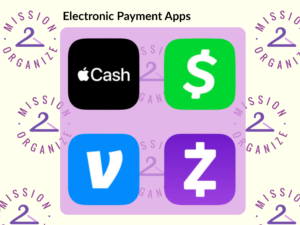
When’s the last time you checked how many apps you use to send, receive, and manage money? If you have Zelle, Venmo, PayPal, Cash App, Apple Pay, Google Wallet, and a handful of accounts connected to all of them, keeping track of your electronic payments can start to feel like a job in itself.
At Mission 2 Organize, we know that the best organizing systems are simple, consistent, and easy to maintain. That goes for your payment apps too. Whether you’re making digital payments to friends, paying bills, or managing cashless transactions, a little organization can make your financial life easier and more secure.
Understand Each Platform’s Strengths…and Limitations
Not every payment app works the same way. Instead of asking which one is “best,” consider what you use each platform to accomplish.
Zelle
Pros: Zelle is designed for quick bank-to-bank transfers, making it convenient for sending money to family, splitting bills, or paying someone you know.
Cons: Zelle transactions can have daily sending limits, depending on your bank or credit union. More importantly, payments generally can’t be reversed once they’re sent, so it’s especially important to confirm the recipient before hitting send.
Organizer Tip: Think of Zelle as your “I know this person” payment method. Double-check the name and amount every time. For first-time payments, consider doing a $1 test transaction to make sure you’ve got the right person.
Venmo
Pros: Venmo is particularly useful for social payments and keeping track of shared expenses with friends. Its transaction history can make it easier to remember who paid for dinner, concert tickets, or a group gift.
Cons: Some transactions may have purchase-protection options, but protection isn’t automatic for every payment. Venmo also offers phone number and identity confirmation features that can help you verify you’re paying the right person, but you still need to pay attention before sending money.
Organizer Tip: Use Venmo for the social expenses you regularly share, and review your privacy settings so you’re comfortable with what information is visible.
PayPal
Pros: PayPal offers established security features and can be useful for online payments and purchases from businesses or individuals. Depending on the transaction, PayPal may also offer purchase protection.
Cons: Certain transactions can involve fees, meaning the recipient (or sometimes the sender) may receive less than the amount sent. Fee structures can vary depending on the type of payment.
Organizer tip: Before sending or requesting money, check whether a fee applies. A quick glance can prevent an unpleasant surprise later.
Cash App
Pros: Cash App is versatile, offering peer-to-peer payments as well as features for things such as business payments and investing.
Cons: More features can also mean more complexity. Not every feature is necessary for everyone, and some transactions or services may involve fees or other limitations.
Organizer tip: If you use Cash App for multiple purposes, keep those uses organized rather than treating everything as one big pool of transactions.
Apple Wallet
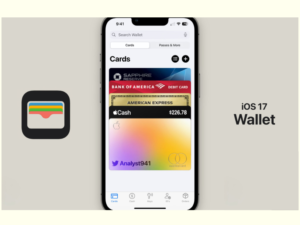
Pros: Apple Wallet lets you keep compatible credit and debit cards, tickets, passes, and other information in one convenient place. When you use Apple Pay, you can make quick contactless payments in stores and online without pulling out your physical card. It can be especially useful if you already rely on an iPhone or Apple Watch.
Cons: Apple Wallet is primarily a wallet for storing and using payment cards and other passes, rather than a peer-to-peer payments app. It also means your payment information is tied to your Apple devices and account, so keeping those devices secured is important.
Organizer Tip: Review the cards stored in your wallet occasionally. Remove expired or unused cards so you aren’t scrolling through a digital stack of payment methods you no longer use.
Google Pay
Pros: Google Pay provides a convenient way to use stored payment cards for online and contactless payments, particularly if you’re already using Android devices or other Google services. Keeping your cards digitally available can reduce the need to carry a physical wallet. As a bonus, it also keeps handy tickets, store loyalty cards, boarding passes, transit passes and gift cards. So convenient!
Cons: Like Apple Wallet, Google Pay is primarily designed for making purchases rather than managing every type of money transfer. Your experience can also depend on your device, bank, card issuer, and the merchant’s payment options.
Organizer Tip: Keep your digital wallet as streamlined as your physical one. While used tickets will be moved automatically to the “Archived Passes” folder, if you haven’t used a stored card in a long time, check whether it should be achived too.
Create a Purpose-Based System
Once you know what each platform does, give your apps specific jobs.
For example:
- Rent or utilities: Use the same electronic payment method every month.
- Family payments: Zelle can be a consistent option for people you know and trust.
- Friends and shared expenses: Venmo can make splitting expenses easier.
- Purchases: PayPal may make sense when a merchant offers it.
- Everyday purchases: Apple Pay or Google Wallet can simplify contactless payments.
- Business or other specialized uses: Cash App may be appropriate depending on the situation.
You don’t have to use every option. If two apps accomplish the same thing, choose the one that fits your habits and stick with it.
Streamline Your Setup
If you’re using Zelle, Venmo, PayPal, and Cash App interchangeably, you may not need all four. On the other hand, if each serves a distinct purpose, there’s nothing wrong with using multiple platforms.
The key is to make the choice intentional.
Start by deciding which app you’ll use for your most common transactions. Then gradually move toward that system rather than trying to reorganize everything at once.
Stay Organized Across Multiple Apps
If you’re using several payment apps, create a simple reference system. Your password manager can keep login information organized, while a phone note or spreadsheet can remind you which app you use for which purpose.
For better financial organization, review transaction histories regularly. Payment tracking can help you spot recurring expenses, forgotten subscriptions, or small purchases that add up.
For simple tips on budgeting, read our blog: Simple Solutions for Budgeting Success
You can also create a consistent system for organizing digital receipts. Whether you save them electronically, email them to a dedicated folder, or record purchases in your budget, keeping receipts in one predictable place makes expense organization easier.
Are you a business owner?
For more tips on managing your business’s payment processing, watch our YouTube video: How 2 Organize Your Business’s Payment Processing Systems
Don’t Forget Recurring Payments
Electronic payments aren’t limited to sending money to other people. Automated payments, recurring payments, and paperless billing can make household finances easier to manage—but they can also make it easy to forget what you’re paying for.
Review your subscriptions periodically. Subscription tracking can help you identify services you’re no longer using and make sure recurring charges are accounted for in your budget management system.

Keep Your Accounts Secure
Organization and security go hand in hand. For every payment app:
- Use a different, strong password.
- Turn on two-factor authentication whenever it’s available.
- Make sure you’re linking the correct bank account or card.
- Turn on transaction notifications and other useful alerts.
- Review spending limits and account settings periodically.
- Use a password manager like 1 Password rather than keeping passwords in a notebook or an unsecured document.
And don’t forget about your mobile wallets. Apple Pay and Google Wallet can make cashless transactions convenient, but convenience shouldn’t mean forgetting which cards and accounts you’ve connected.

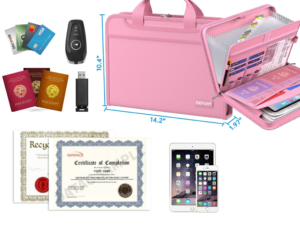
If you’ve already gone digital with your wallet, but you still want to hold on to the physical card and any important account documents, we suggest this fireproof card and document organizer.
Watch Out for Scams
Electronic payments are convenient, but scammers know that convenience can work in their favor.
Be especially cautious when someone:
- Creates a sense of urgency.
- Asks you to send money to “fix” an account or prevent a problem.
- Claims you’ve accidentally received money and asks you to send it back.
- Requests payment through an unfamiliar method.
- Sends a message asking you to click a link or provide a verification code.
- Uses a username, phone number, or email address that doesn’t match what you expect.
Never share a verification code or password with someone who contacts you unexpectedly. And before sending money, stop and verify the recipient independently. A few extra seconds can prevent a much bigger problem.
Final Thoughts
Good organizing systems aren’t necessarily about having fewer things. They’re about knowing what you have, where it belongs, and how to use it.
The same principle applies to digital payments. Give each payment app a purpose, secure your accounts, watch for scams, and create a simple system for tracking transactions. When your system is consistent, managing your money becomes one less thing to keep straight in your head, and that’s a kind of organization that really makes cents!
Which are your favorite digital apps to use and how do you keep them organized?