

How many streaming services are you paying for right now? Between Netflix, Hulu, Disney Plus, HBO Max, Amazon Prime Video, and all the other platforms competing for your attention, it’s easy to accumulate monthly subscriptions without realizing how much they cost. Add in a few free trials, a forgotten account, or a service you signed up for to watch one show, and your digital entertainment budget can quickly get out of hand.
At Mission 2 Organize, we believe that good organizing systems make life easier, and that includes organizing your subscriptions. With a little planning, you can enjoy your favorite shows, discover new movies, and save money without sacrificing your entertainment.
Track Your Streaming Subscriptions
The first step to getting organized is knowing what you have. You might be surprised by how many streaming accounts you’re paying for, especially if different family members signed up for different services.
Start by reviewing your bank and credit card statements for recurring charges. Check your app store subscriptions, too, since some services are billed through Apple or Google rather than directly by the streaming company.
Once you have a complete list, choose a subscription tracking system that works for you.
- Use a tracking app. Services such as Rocket Money can help identify recurring subscriptions and give you a clearer picture of where your money is going. Review any app’s features, fees, and cancellation process before signing up.
- Create a spreadsheet. A simple tech tracking spreadsheet can be just as effective. List each service, its monthly or annual cost, billing date, payment method, and cancellation instructions.
- Set a recurring reminder. Schedule a quarterly or yearly subscription review so you can catch price increases, unused services, and duplicate accounts.
This is a great opportunity to practice account organization. Keep subscription information in one place rather than relying on memory to track what you’re paying for.
Try the Streaming Rotation Method
Do you subscribe to a service because you want to watch one particular show, only to forget about it after the season ends? You’re not alone!
Instead of paying for every service simultaneously, try a streaming rotation. Choose one platform, watch the shows and movies you’re interested in, then cancel before moving on to the next.
For example, you might spend a month catching up on Netflix, switch to Hulu the following month, and subscribe to Disney Plus when there’s something new you want to see. HBO Max, Peacock, and Paramount Plus can take their turns too.
The key is to watch with a plan in mind. Before subscribing, make a list of the shows and movies you want to see. Check which platform carries them and whether the content is currently available. Your watchlists and movie lists can help you decide which subscription deserves your money next.
Remember to cancel before the next billing date if you don’t plan to continue. Set a reminder when you sign up so you don’t have to rely on remembering later.

Make Sign-Ups and Cancellations Part of Your System
Signing up for a streaming service is often quick and easy. Canceling can require a little more attention, especially if you subscribed through a third party.
Before starting a subscription, check the price, renewal date, trial terms, and cancellation policy. If you’re using a free trial, set a reminder a few days before it expires. That gives you time to decide whether the service is worth keeping.
When you cancel, save the confirmation email or screenshot the confirmation page. Then update your subscription spreadsheet or tracking app.
Keep in mind that deleting an app from your television or phone generally does not cancel the subscription. You may need to cancel through the streaming provider, an app store, or another billing service.
A little organization at sign-up time can prevent months of unwanted charges later.

Share Strategically: Family Plans and Extra Member Slots
Before paying for another streaming service, find out whether your existing plan offers a family option, additional profiles, or extra member slots.
Some services, including Netflix, offer plan-dependent ways to add extra members. The rules, fees, and availability can vary, so review the current terms before deciding whether sharing makes financial sense.
Family plans and shared accounts can be useful when they’re permitted under a service’s rules. However, don’t assume that sharing a password is allowed simply because you know the other person. Check household requirements and account-sharing policies first.
If several people in your household use the same service, create separate family profiles when available. Kids profiles and parental controls can help parents manage age-appropriate viewing, while individual profiles keep recommendations and watchlists from becoming a jumble.
Organize Your Logins and Favorite Content
When you have multiple streaming platforms, keeping track of user names and passwords can become its own organizational challenge.
Use a reputable password manager like 1Password to simplify login management and password organization. Avoid reusing passwords across accounts, and enable two-factor authentication when available. If family members need access, use the service’s authorized sharing features rather than passing passwords around unnecessarily.
You can also organize your viewing content. Use watchlists to collect shows you want to watch, movie lists for family movie nights, and each platform’s available sorting or favorites features to keep track of what interests you.
A simple master list can help too. Record the title, streaming platform, and whether you want to watch it now or save it for later. That way, you’re less likely to subscribe to a service only to discover you’ve forgotten what you wanted to see.

Don’t Forget Your Streaming Devices
Financial organization is only part of the picture. Your physical entertainment setup can benefit from a little attention too.
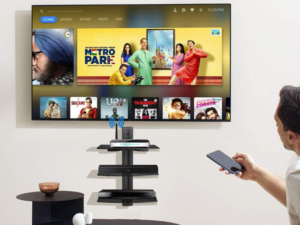
Whether you use smart TV apps, a Roku, Fire TV, Apple TV Device, or Chromecast, review your installed apps occasionally. Remove apps you no longer use, reorganize the ones you keep, and make sure everyone knows which device or input to use.
If your television area has become cluttered with remotes, charging cables, and accessories, tackle your cable management and entertainment center organization at the same time. Group related accessories together, label cables and remotes if necessary, and keep frequently used items within easy reach.
This kind of physical decluttering makes your entertainment area easier to use and maintain.
Consider Other Ways to Access Streaming Services
Sometimes you can enjoy streaming without paying for another full subscription. If you’re pet-sitting, babysitting, or housesitting, ask the homeowner whether you may use their television and streaming accounts while you’re there. Always get permission, follow their account-sharing rules, and sign out when you’re finished.
You can also check whether your internet or mobile provider offers a streaming benefit, or whether a service is included with a membership you already pay for. Amazon Prime Video, for example, may be part of an existing Amazon Prime membership, although some content and add-ons cost extra.
Before adding a new monthly bill, make sure you’re not already paying for access somewhere else.

Final Thoughts
Streaming should be an enjoyable part of life—not another source of financial stress. By tracking your subscriptions, rotating services, organizing logins, and making thoughtful choices about sharing, you can enjoy digital entertainment while keeping costs under control.
At Mission 2 Organize, we know that the best systems are the ones you can maintain. Give your streaming services a regular checkup, keep your accounts organized, and make room in your budget for the shows and movies you truly enjoy. A little planning can help you spend less time managing subscriptions and more time relaxing in front of the screen!
What are your favorite ways to keep track of your streaming platforms? Tell us in the comments!